How to Create Viral Reels Using CapCut
In the modern world of social media, short-form videos have taken center stage. Platforms like Instagram Reels, TikTok, and YouTube Shorts are thriving because users prefer bite-sized, visually engaging content. Creating reels that go viral requires more than just recording videos; it demands creativity, strategy, and the right tools. CapCut, a versatile video editing app by ByteDance, has become a go-to choice for content creators aiming to produce high-quality, attention-grabbing reels. This guide will take you through every step of creating viral reels using CapCut, from planning and editing to optimizing and analyzing performance.
Why CapCut is the Best Tool for Creating Viral Reels
CapCut stands out among video editing apps due to its combination of accessibility, advanced features, and social media optimization. Here’s why content creators trust it:
User-Friendly Interface: Even beginners can navigate CapCut with ease. Its intuitive layout allows users to drag and drop clips, trim footage, and add effects without a steep learning curve.
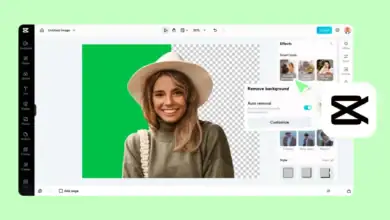
Advanced Editing Features: CapCut provides tools like keyframe animations, transitions, chroma key (green screen), and AI-powered effects. These tools let creators add cinematic flair to even the simplest videos.
Optimized for Social Media: CapCut supports different aspect ratios and resolutions ideal for Reels, TikTok, and Shorts, ensuring your content fits perfectly on every platform.
Music Library and Sound Effects: CapCut has a massive library of royalty-free music, trending sounds, and sound effects. Using the right audio can significantly increase your chances of going viral.
Frequent Updates: CapCut frequently updates with new features and effects, keeping content creators on top of current trends without needing multiple apps.
With these advantages, CapCut allows creators to focus on storytelling and creativity rather than technical difficulties.
Planning Your Reel for Maximum Engagement
The foundation of a viral reel is strategic planning. Even before opening CapCut, you should have a clear concept. Viral content typically follows certain psychological triggers, such as curiosity, humor, or emotional appeal.
Hook Your Audience Early: Studies show that the first 3–5 seconds determine if a viewer keeps watching. Start with an eye-catching clip, a surprising statement, or a bold visual to grab attention.
Identify Your Target Audience: Knowing who your audience is will guide your content style, music choices, and editing pace. For example, Gen Z viewers respond well to fast cuts and trendy music, while professional audiences prefer polished, informative content.
Focus on One Main Idea: A short, clear message resonates better than overcomplicated content. Decide whether your reel is educational, entertaining, or inspiring.
Incorporate Trends and Challenges: Viral content often aligns with trending hashtags, music, or challenges. Research social media trends to ensure your content is timely and relevant.
Storyboard Your Reel: Even a simple sketch of your sequence can prevent confusion during editing and ensure smooth pacing.
Effective planning reduces editing errors, saves time, and increases the likelihood of creating shareable content.
Importing and Organizing Clips in CapCut
After planning, the next step is organizing your media in CapCut. Proper organization is critical for efficiency and quality.
- Open CapCut and select New Project.
- Import all your video clips, images, and audio files. Make sure you have backup versions in case you need to replace any clip.
- Arrange clips in a logical order on the timeline. CapCut’s drag-and-drop interface makes rearranging easy.
- Trim unnecessary footage. Fast-paced reels retain viewers better, so remove long pauses or irrelevant scenes.
- Label or color-code clips for easier navigation if your reel uses multiple layers or effects.
Taking time to organize clips ensures that your editing process is smooth and allows you to focus on creative aspects like transitions, effects, and storytelling.
Editing Techniques to Make Reels Stand Out
CapCut provides powerful editing tools to make your content visually appealing. Here’s how to use them effectively:
Transitions and Effects
Dynamic Transitions: Use zoom, spin, slide, or glitch transitions to maintain flow between clips. Smooth transitions make your video look professional.
Subtle Use of Effects: Overusing effects can distract viewers. Focus on enhancing storytelling, not overwhelming it.
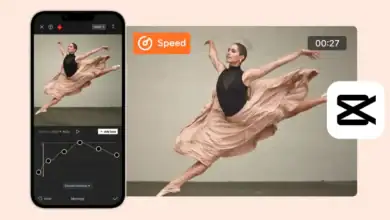
Trending Effects: Certain effects, like glitch, split-screen, or speed ramping, are popular on social media and can increase shareability.
Keyframes and Motion Effects
Animating Elements: Keyframes let you animate text, images, and stickers to create movement that draws the eye.
Smooth Motion: Motion effects make your video feel alive. For example, adding a slight zoom on key moments increases emotional impact.
Text Overlays and Captions
Readable Text: Use bold, contrasting fonts to ensure viewers can read text on mobile screens.
Animated Captions: Animated captions or text pop-ups help highlight important points and keep viewers engaged.
Accessibility: Captions allow people watching without sound to understand your content, increasing watch time and engagement.
Filters and Color Grading
Vibrant Colors: Bright, colorful visuals are more likely to stop viewers scrolling.
Consistency: Maintain a consistent color scheme across reels to strengthen branding.
Mood Setting: Use color grading to match the tone of your content—for example, warm tones for happy content, cooler tones for dramatic content.
Adding Trending Music and Sounds
Audio is a core element of viral reels. The right sound can increase reach and engagement exponentially.
- Explore CapCut’s music library for trending or relevant tracks.
- Sync beats with transitions, cuts, or dramatic moments for impact.
- Use voiceovers to add narration, explanations, or humor.
- Check platform trends—sounds trending on TikTok or Instagram often give reels extra algorithmic boosts.
Music and sound effects not only enhance content quality but also improve discoverability since social media platforms promote videos using trending audio.
Optimizing Video Format and Length
Optimizing video format is essential for performance and shareability:
Aspect Ratio: Vertical 9:16 videos are standard for Instagram Reels, TikTok, and Shorts.
Duration: Keep reels between 15–30 seconds for maximum retention.
Opening Clips: Start with your most exciting scene to hook viewers immediately.
High Resolution: Export in high quality to ensure crisp visuals. Blurry videos reduce watch time and engagement.
CapCut provides export options optimized for social media, making it easier to publish professional-grade reels.
Exporting and Sharing Your Reel
Publishing your reel is as important as editing:
Tap Export in CapCut and select High Quality.
Enable the highest frame rate for smoother motion.
Add captions, hashtags, and a compelling description when sharing on social media.
Engage viewers with a call-to-action, such as asking them to like, share, or comment.
Sharing with a well-structured strategy enhances the chances of your reel gaining traction and reaching a broader audience.
Analyze and Iterate
Creating viral reels is an ongoing process. Consistently tracking performance helps refine your strategy:
Engagement Metrics: Monitor likes, shares, comments, and watch time to identify which reels perform best.
Audience Feedback: Comments often provide valuable insights into what resonates.
Trend Analysis: Observe current trends and adjust your content accordingly.
Reuse Successful Techniques: CapCut allows you to save templates and editing presets for future reels, saving time while maintaining quality.
Iteration is the key to sustained growth on social media. The more you analyze, the better your content becomes over time.
Expert Tips for Creating Viral Reels in CapCut
Speed Ramps and Slow Motion: Emphasize dramatic moments to captivate viewers.
CapCut Templates: Replicate popular editing styles without starting from scratch.
Stickers and Emojis: Add humor, relatability, or emphasis to your content.
Brand Consistency: Subtle logos or watermarks help viewers remember your content without distracting from the message.
Test Variations: Slightly different versions of a reel can help determine which format performs best.
Using these advanced techniques ensures that your content not only looks professional but also increases the likelihood of virality.
Conclusion
Creating viral reels requires a combination of creativity, strategy, and technical skill. CapCut equips creators with all the tools necessary to produce high-quality, engaging content that resonates with audiences. By planning carefully, applying advanced editing techniques, using trending music, optimizing for social media, and analyzing performance, anyone can significantly increase their chances of producing viral reels. Consistency, creativity, and attention to trends remain the cornerstones of social media success.
With practice, experimentation, and CapCut’s powerful features, you can consistently create reels that captivate viewers and grow your online presence.